Describing your business clearly
Your AI Profile starts with two things: your business and the person behind it.
And the good news is that you already know most of what you'll need to put here.
What you do. Who you help. Your experience. The work you're particularly good at.
The aim is to describe those things clearly and accurately, using language your customers would recognise.
You don't need to write for an algorithm or learn anything technical. StructuredAF takes care of the technical side.
Before you start typing
A useful profile is one that's:
- Accurate: everything you include is true and up to date.
- Specific: it explains what makes your work different from something similar.
- Consistent: the facts agree with what's already on your website.
- Public: you're comfortable with the information being published.
- Clear: someone unfamiliar with your business could understand it.
You don't need to repeat keywords, make every field sound impressive or fill in optional details just because there's a space for them.
This is a description of a real business, not an application for The Apprentice.
One thing worth knowing: Business Details and Your Details are separate pages in your dashboard. Each has one Save button at the bottom.
The headings within those pages are simply there to organise the information. Fill in what you can, then save the page when you're ready.
Your business
Start with the business itself. This is the central record that connects your professional profile, your services and the information StructuredAF publishes about your website.
There are five required fields before you can save. Your dashboard will show you which they are.
You can also add your logo, telephone number, founding date, location, awards and a link to your contact page. Include what's relevant and useful.
And please don't publish your private home address just to make your profile look more complete. If you work online or from home, only share location information you're comfortable making public.
Writing your business description
Only the first 200 characters of your business description are included in the published profile.
Your full description is saved in your account, but the published version stops at 200 characters. So put the most useful information first.
Start with what you do and who you help. Leave the mission statement, inspirational introduction and grand promises for somewhere else.
The second description tells us what the business actually does, who it's for and what the work involves. That's useful information, whether the reader is a person or a system interpreting your website.
The person behind the business
Now it's your turn.
If you're a coach, consultant or independent professional, your experience and expertise are often a big part of what clients are buying. They're not just choosing a programme or a service.
They're choosing the person whose knowledge, judgement and approach they trust.
This section connects you to the business. Only your first and last name are required to save, but it's worth adding the other details that help explain your professional background.
You can also include skills, qualifications, certifications, education, professional memberships, awards and a link to your About page. You don't need every possible credential. Just the ones that are true and relevant to the work you do.
Choosing a job title
Your job title should make sense to someone who has never heard of you.
You don't need to squeeze every service you've ever offered into your title. It's there to identify your professional role, not reproduce your entire CV.
Writing your bio
Around 500 characters of your bio are included in the published profile.
Lead with the most relevant information, so the important part makes it through.
This is your opportunity to explain why you're qualified to do the work you do. Depending on your business, that might include your professional background, specialist experience, qualifications, the clients you work with or your particular approach.
The second version gives someone a much clearer idea of the person's experience and the work they actually do.
This isn't about making yourself sound more qualified than you are. Include awards, client numbers, qualifications and results where they're accurate and relevant.
Specific nonsense is still nonsense, just with better punctuation.
Accurate beats complete
It's tempting to fill in every field, especially when you're presented with a nice orderly form. But more information isn't automatically better information.
Before you save, take a moment to check that:
- Your job title and credentials are current
- Your experience figures are accurate
- The details agree with what's on your website
- Any results or achievements are described fairly and with the right context
- You're not listing services you no longer offer
- You haven't included personal information you'd rather keep private
You don't need to use identical wording on your website, LinkedIn and StructuredAF. But the underlying facts should agree. If your website says you've worked in your field for eight years and your profile says five, that's worth sorting out.
Consistency is about getting the facts right, not copying and pasting the same paragraph everywhere.
Adding your logo and photo
This is the bit that catches people out most often, so it's worth explaining properly.
StructuredAF needs a direct link to the image itself, rather than a link to a webpage where the image appears. A suitable link should:
- Start with https://
- Work without anyone needing to log in
- Open the image itself, not a webpage or file preview
- Continue working when you're logged out of your website
The link doesn't necessarily need to end in .jpg or .png. Some perfectly good image links use different formats.
How to find the right link
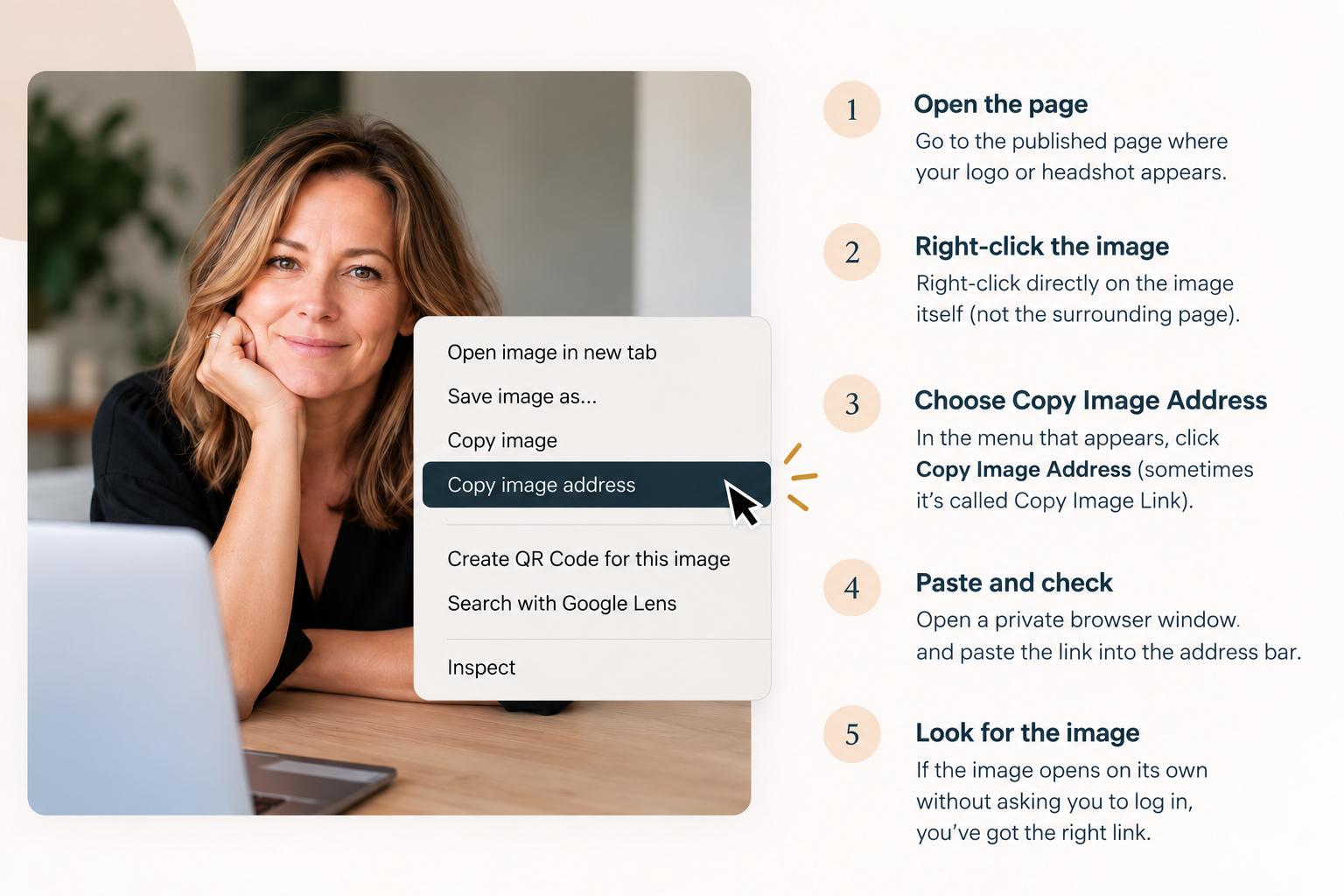
- Open the published page where your logo or headshot appears.
- Right-click directly on the image.
- Choose Copy Image Address or Copy Image Link.
- Open a private browser window and paste the link into the address bar.
- If the image opens on its own without asking you to log in, you've found the right link.
Google Drive and Dropbox sharing links won't work, because they normally open a file-sharing page rather than the image itself.
Where possible, use images hosted in your own website's media library. That way, you're less dependent on a third-party link staying the same.
What comes next?
Once you've added your business and professional details, you're ready to describe what you actually offer. That might be coaching packages, consulting services, online courses, programmes or something else entirely.
You'll also be able to add the questions customers commonly ask before deciding whether to work with you.
It's worth completing those sections before generating your AI Profile. You can generate a profile before you've finished, but you'll be publishing an incomplete description of your business. Better to get the important details in place first.
Ready for the next bit?
Next up: your offers and FAQs. This is where you explain what people can buy from you, who it's right for and what they need to know before making a decision.
Continue to Offers and FAQs →